Disclaimer: This article is for educational and informational purposes only. It does not constitute financial or investment advice. Trading forex and CFDs carries significant risk of loss. Past performance of any strategy — including backtests — does not guarantee future results. Never trade with money you cannot afford to lose.
What Is This Strategy?
The Breakout Channel Rider is a pure price-action, dual-channel breakout strategy for MetaTrader 5 — a trend-following system that reads its trade signals directly from raw bar highs and lows rather than from any technical indicator. There is no moving average, no RSI, and no ATR (Average True Range) anywhere in the logic. A channel breakout, in trading terms, simply means price closing beyond the highest high or lowest low of a recent block of bars, which by definition marks a fresh directional move through recent structure.
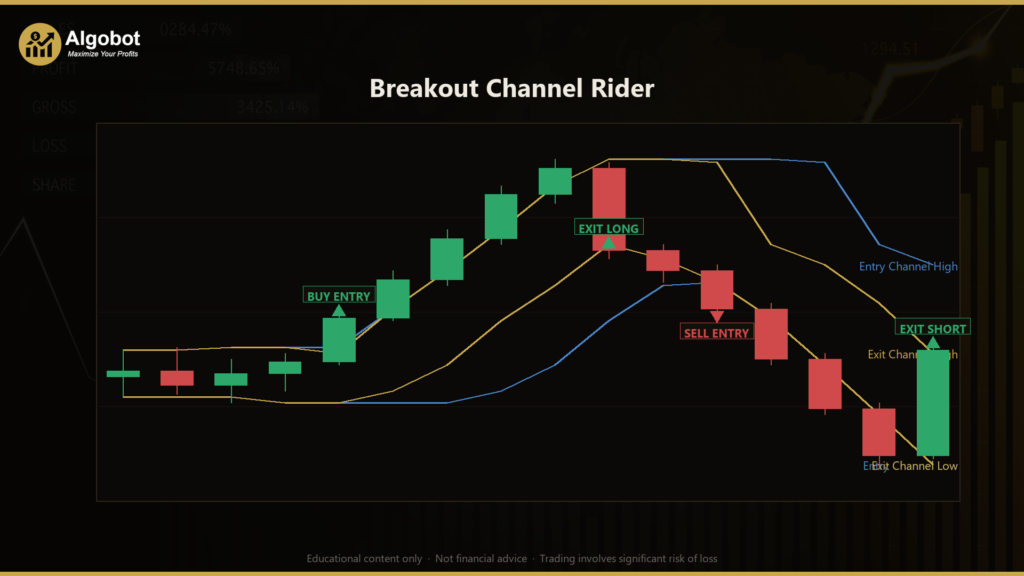
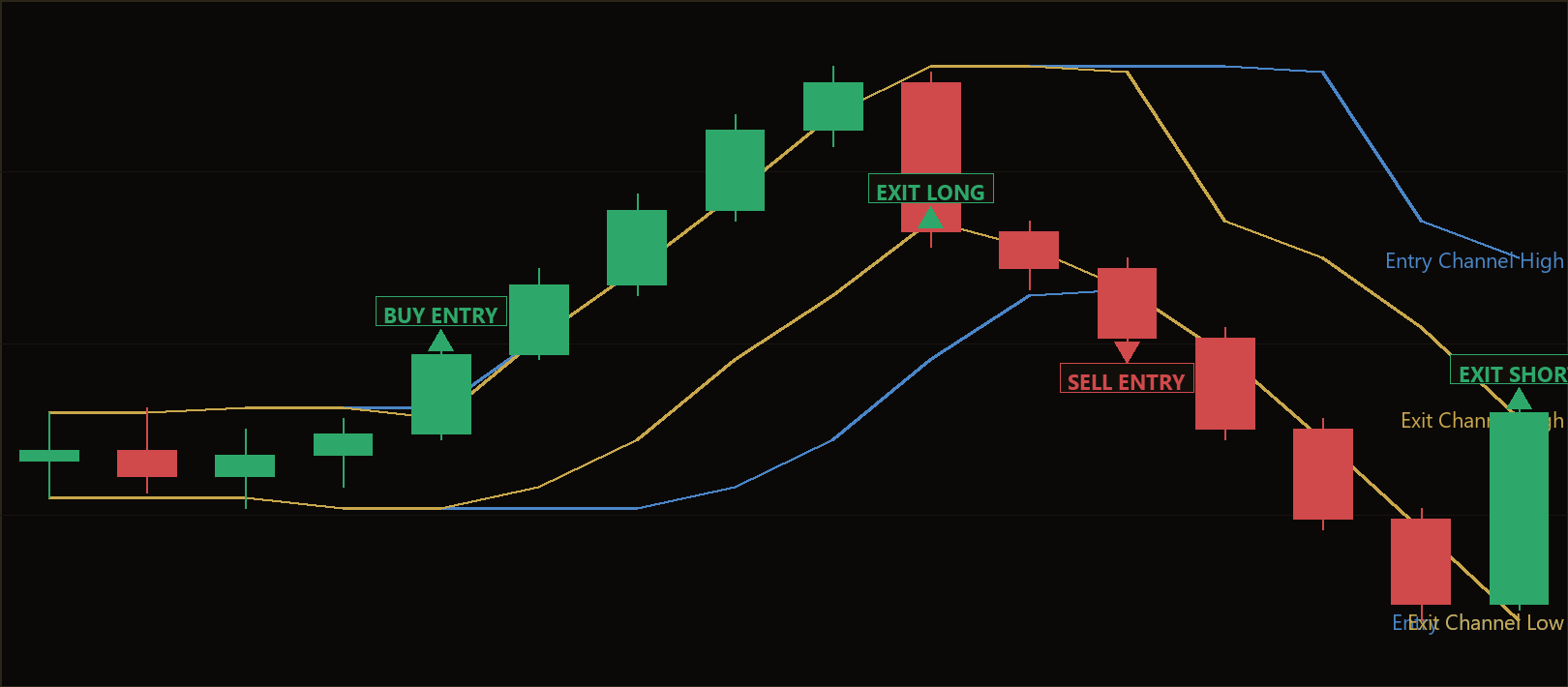
This strategy is designed for trending market conditions. The core premise of any breakout approach is that once price decisively clears a band of recent congestion, the move that follows tends to continue in the same direction for a while. The Breakout Channel Rider aims to capture the middle of that move: it enters on the break and then "rides" the position with a faster, opposite-facing channel that trails behind price, releasing the trade only when the market closes back through recent structure in the other direction.
As a learning tool, this EA (Expert Advisor — an automated trading program for MT5) is well suited to traders who want to study how classic Donchian-style channel breakouts behave without the smoothing or lag introduced by indicators. Because every level is structural and every distance is expressed as a fraction or multiple of the live channel height, the system is point-size and timeframe agnostic, making it a useful sandbox for understanding trend-following mechanics across different symbols and timeframes. It is best viewed as a study of structure-based logic, not as a profit opportunity.
How It Works
The strategy evaluates only once per newly-closed bar. The bar that just finished forming is treated as the "signal" bar, and all channel levels are measured from the bars before it — so a level never references the same bar that triggers it. Here is what the strategy signals, step by step.
Entry conditions (only when flat — no position open):
- The strategy measures the highest high and lowest low of the prior
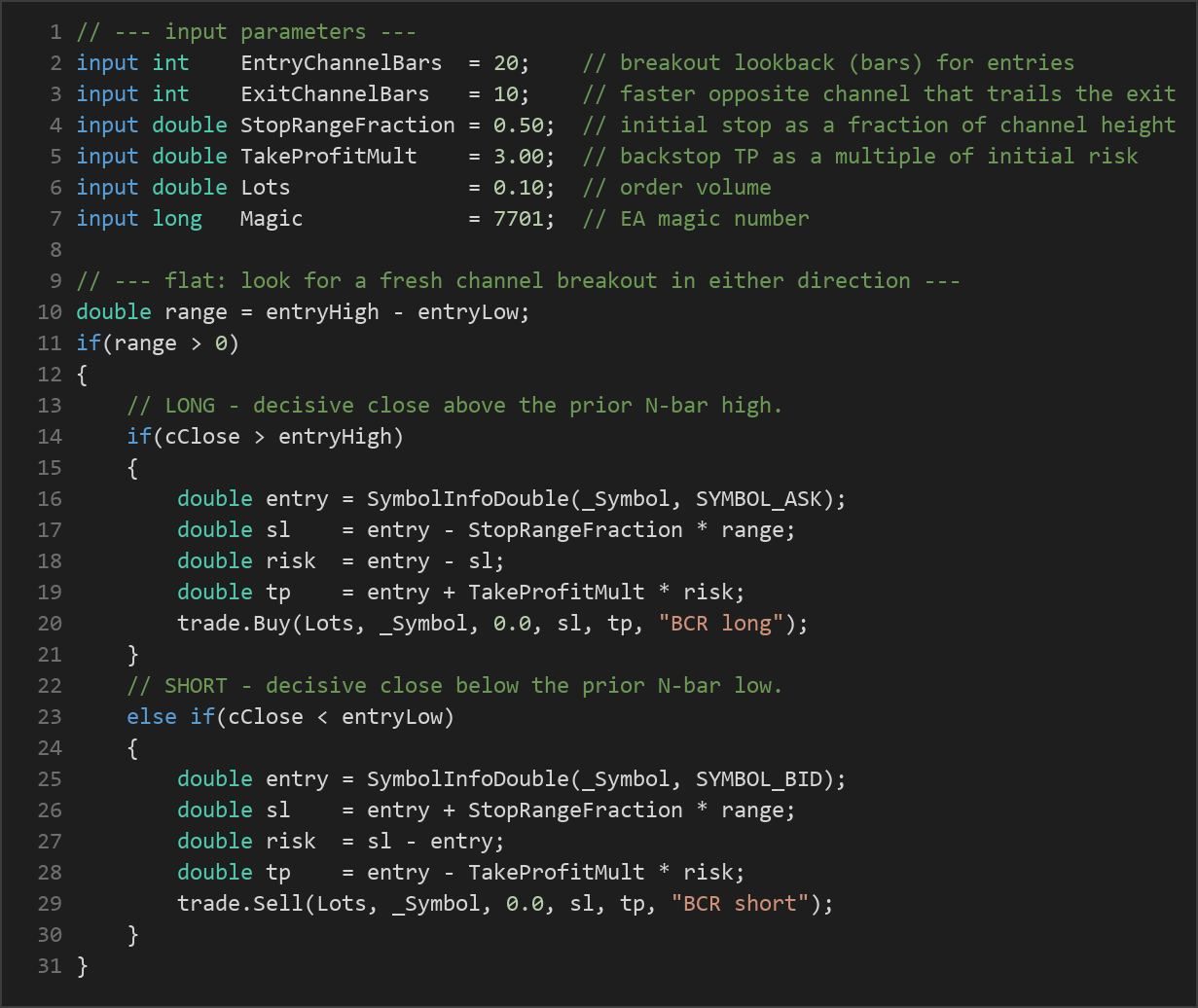
EntryChannelBarscompleted bars (default 20). This band is the entry channel. - A long signal occurs when the just-closed bar closes above the highest high of that entry channel — a decisive upside break of recent structure.
- A short signal occurs when the just-closed bar closes below the lowest low of that entry channel — a decisive downside break.
- The system trades in only one position at a time; new entries are considered only when there is no open trade.
Stop-loss logic:
- The initial protective stop is placed
StopRangeFractionof the entry-channel height away from the entry price (default 0.50, i.e. half the channel height). - The reasoning: a break that immediately retraces that far back into the channel is treated as a failed break — an invalidation of the breakout idea — and the stop closes the trade.
Take-profit logic:
- A backstop take-profit is set at
TakeProfitMultmultiples of the initial risk distance (default 3.0, a 3:1 reward-to-risk backstop). - This is a safety target rather than the primary exit. The strategy is built to ride trends, so most trades are intended to be released by the trailing channel before this fixed target is reached.
Exit / ride conditions (only when in a trade):
- While long, the strategy measures the lowest low of the prior
ExitChannelBarsbars (default 10 — a faster, shorter channel than the entry one). The long is closed the moment a bar closes below that lowest low. - While short, it measures the highest high of the prior
ExitChannelBarsbars, and closes the short when a bar closes above that highest high. - Because the exit channel is shorter than the entry channel, it hugs price more tightly. This lets winners run while a snap-back through recent price action cuts the trade. The code enforces that the exit channel is always strictly faster than the entry channel.
Strategy Parameters
| Parameter | Default | Min | Max | Description |
|---|---|---|---|---|
| EntryChannelBars | 20 | 5 | 60 | Lookback in bars for the breakout high/low that triggers an entry. Larger values require a bigger move to enter. |
| ExitChannelBars | 10 | 3 | 40 | Lookback in bars for the faster opposite channel that trails the exit. Must be shorter than the entry channel; smaller values exit sooner. |
| StopRangeFraction | 0.50 | 0.20 | 2.00 | Initial protective stop as a fraction of the entry-channel height. Lower values give tighter stops. |
| TakeProfitMult | 3.00 | 1.00 | 8.00 | Backstop take-profit as a multiple of the initial risk distance (reward-to-risk ratio). |
| Lots | 0.10 | 0.01 | 1.00 | Order volume (position size) in lots per trade. |
| Magic | 7701 | 0 | 9,999,999 | EA magic number used to identify and manage this strategy's own trades. |
Recommended Chart Settings
The Breakout Channel Rider is intentionally symbol- and timeframe-agnostic, because all of its distances are expressed relative to the live channel height rather than in fixed pips. In practice, channel breakout systems are most commonly studied on the M15 to H4 timeframes, across instruments such as major forex pairs, gold (XAU/USD), or stock indices, where trends tend to be cleaner and structure is well defined.
A reasonable starting point for study is an H1 chart on a major FX pair with the default parameters. As always, you should test the strategy on the specific symbol and timeframe you intend to study, because behavior will vary considerably across different market conditions, sessions, and volatility regimes. There is no single "correct" setting — the defaults are a balanced baseline, not a recommendation.
How to Install on MetaTrader 5
- Download the
BreakoutChannelRider.ex5file from the link below. - Copy it to your MT5
MQL5\Expertsfolder. - Restart MetaTrader 5 or refresh the Navigator panel.
- Drag the EA onto a chart matching the recommended symbol and timeframe.
- Configure the input parameters and enable Algo Trading.
What to Consider Before Using This EA
Like every strategy, the Breakout Channel Rider has clear strengths and equally clear limitations, and understanding both is the point of studying it.
Strengths of this approach:
- It is transparent and easy to reason about — every decision traces back to a visible high or low on the chart, with no hidden indicator math.
- The trailing exit channel allows trades to follow extended trends rather than capping gains at a fixed target, which historically is where trend-following systems earn their edge.
- Because levels are structural and distances are relative, the same logic adapts to different symbols and timeframes without recalibrating pip values.
Known limitations:
- Breakout strategies are characteristically vulnerable to range-bound or choppy markets, where price repeatedly breaks a channel and then reverses. These "false breakouts" can produce a string of small losing trades — a pattern often called whipsaw.
- Trend-following systems typically have a lower win rate with larger average winners, so equity can experience long flat or drawdown periods between strong trends. This can be psychologically demanding.
- The strategy acts only on bar close and trades a single position at a time, so it may give back open profit during the bar that finally triggers the trailing exit.
- Slippage, spread, and commission can meaningfully affect breakout entries, since they often fill during fast-moving conditions.
This is not a "set and forget" solution; it is a structural framework whose behavior depends heavily on the character of the market you apply it to.
Risk Management Tips
Sound risk management matters more than any single parameter setting. Consider these general principles as you study the strategy:
- Position sizing: Size each trade so that a stop-out costs only a small, predefined fraction of your account. A common educational guideline is to risk no more than 1–2% of account equity per trade.
- Test on a demo account first: Run the EA on a demo or simulated account until you understand how it behaves across trending and ranging conditions before considering anything else.
- Understand drawdown: Trend-following equity curves can include extended losing streaks. Know the maximum drawdown you are prepared to tolerate, both financially and emotionally, in advance.
- Mind leverage: Leverage magnifies both gains and losses. Use it conservatively and understand your margin requirements.
- Review regularly: Markets change. Periodically re-examine whether the strategy's assumptions still match current conditions, and never assume past behavior will repeat.
Risk Warning
Trading foreign exchange, CFDs, and other leveraged financial instruments involves substantial risk of loss and is not suitable for all investors. The strategies and tools discussed on this page are provided for educational purposes only and do not constitute financial advice, investment recommendations, or solicitation to trade. Always consult a qualified financial adviser before making trading decisions. Past backtest performance is not indicative of future results.
Downloads
- Expert Advisor: BreakoutChannelRider.ex5 (63 downloads)
- Source Code: BreakoutChannelRider.mq5 (62 downloads)
- Documentation: BreakoutChannelRider.pdf (69 downloads)